

Data warehouse modernization is now one of the most common enterprise data initiatives — and one of the most mismanaged. The organizations getting it right are not necessarily the ones with the biggest budgets. They are the ones that understand exactly what they are migrating away from, what they are migrating to, and why.
This guide covers everything you need to make that decision with clarity: the signals that tell you your legacy stack has hit its ceiling, how the modern data lakehouse architecture actually differs (not just in marketing), which migration path fits your organization, and what separates migrations that finish on time from those that drag on for two years.
3–4× Faster query performance on modern lakehouse vs. legacy warehouse
60% Average cloud infrastructure cost reduction post-migration
40% Reduction in data engineering maintenance overhead
$330B Global data management market by 2026, growing 12% annually
Signs Your Legacy Warehouse Has Outgrown Your Business
Before any architecture conversation, it helps to be precise about what is actually broken. Legacy data warehouses do not fail all at once — they degrade gradually until the operational cost of maintaining them exceeds the cost of replacing them. These are the signals we see most consistently across enterprise data environments:
- Query performance degrades as data volume grows. What once took seconds now takes hours. You manage this with partitions, indexes, and caching workarounds — each of which adds complexity without solving the root problem.
- Real-time or near-real-time reporting is impossible or prohibitively expensive. Business teams wait hours or days for dashboards to reflect reality, which means decisions are made on yesterday's data.
- Adding new data sources takes months. Every new integration — a marketplace, a third-party tool, a customer data platform — requires a project, not a configuration. Your data team spends more time maintaining pipelines than delivering insights.
- Data silos proliferate. Different teams run queries against different copies of the same data, and the resulting number discrepancies undermine trust in your reporting.
- Cloud costs have ballooned. You are scaling compute and storage together, even when you only need one. The pricing model that made sense at your previous data volume no longer does.
- Machine learning and AI workloads are impractical. Running models against production data requires duplicating the entire dataset into a separate environment, creating synchronization problems and governance gaps.
- Data governance is manual. Lineage is undocumented, access controls are inconsistent, and compliance reporting requires manual effort before every audit.
🎯 Key Signal If three or more of the above describe your current environment, you are not dealing with a performance tuning problem. You are dealing with an architecture problem — and tuning will not fix it.
What "Modern Stack" Actually Means — Without the Buzzwords
The phrase "modern data stack" is overused to the point of meaninglessness in vendor marketing. But the architectural shift it describes is real — and it matters for how you plan and scope a migration.
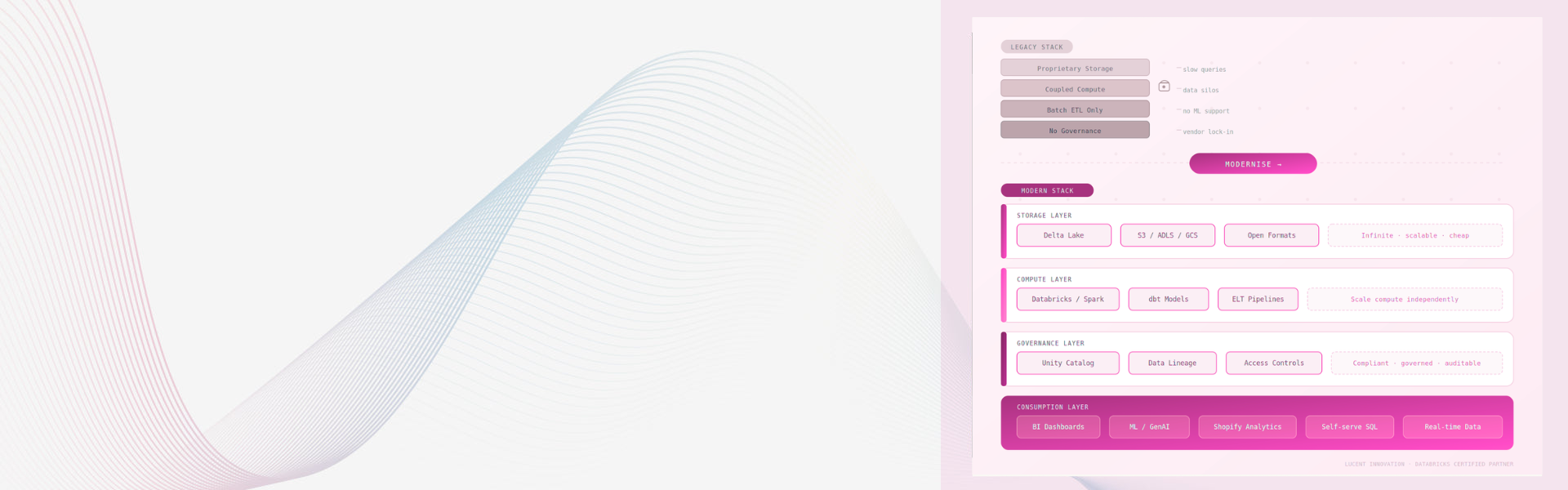
The legacy model: all data lives in one place (the warehouse), compute and storage are tightly coupled, transformations happen on write (ETL), and the system is optimized for structured SQL queries against known schemas. Flexibility is sacrificed for performance on predictable workloads.
The modern lakehouse model inverts several of those assumptions.
LEGACY ARCHITECTURE
  Source Systems ──ETL──▶ Proprietary Warehouse ──▶ BI Reports
                         (transform on write, coupled compute + storage)

MODERN LAKEHOUSE ARCHITECTURE
  Source Systems ──▶ Cloud Storage (S3/ADLS/GCS)
                              │  Delta Lake / Iceberg / Hudi
                              ▼
                    Databricks (Spark compute) ──▶ dbt Models
                              │
                              ▼
         BI Tools  ML / GenAI  Self-serve SQL  Data Science
                    (transform on read, independent scaling)
Layer 1 Storage Open · infinite · cheap
Layer 2 Compute On-demand · independent
Layer 3 Governance Lineage · access · compliance
Layer 4 Consumption BI · ML · GenAI · SQL
What changes, specifically
Separated compute and storage. Cloud storage (S3, ADLS, GCS) is infinitely scalable and cheap. Compute spins up on demand. You stop paying for idle capacity, and you can scale each independently based on actual workload requirements.
ELT replaces ETL. Data lands in its raw form first — inside the lakehouse. Transformations happen inside the platform, closer to the consumers, in version-controlled dbt models. Source fidelity is preserved, and re-processing historical data when requirements change is trivial rather than a multi-month project.
Open table formats. Delta Lake, Apache Iceberg, and Apache Hudi replace proprietary storage formats. Your data is not locked to a vendor. Multiple engines — Spark, SQL, Python, BI tools — can query it simultaneously without duplication.
ACID transactions on data lakes. The classic knock on data lakes was reliability — no transactions, no schema enforcement, no guarantees. Delta Lake resolves this. You get ACID transactions, schema enforcement, and time travel (the ability to query data as it existed at any historical point) on top of open cloud storage.
📊 Why Databricks Specifically Databricks, built on Apache Spark and Delta Lake, is the dominant platform for enterprises moving to lakehouse architecture. It is the only platform that natively unifies data engineering, data science, machine learning, and BI workloads in a single runtime — which means no data duplication between your reporting and ML environments.
The Three Migration Paths — and When to Use Each
There is no universal migration playbook. The right approach depends on your existing architecture, team capability, data volume, and business risk tolerance. Most enterprises fall into one of three patterns:
| Migration Path | Best For | Timeline | Risk Level |
|---|---|---|---|
| Lift and Shift | Reducing cost and cloud dependency without rewriting pipelines | 2–4 months | Low |
| Parallel Run + Cutover | Enterprises needing zero downtime with validated output parity | 4–8 months | Medium |
| Greenfield Rebuild | Organisations whose current architecture is too rigid to migrate incrementally | 6–12 months | High (managed) |
Lift and Shift
You move existing workloads to a cloud-native platform with minimal rewriting. This reduces infrastructure overhead and unlocks cloud elasticity, but it does not fundamentally change your data architecture. The old transformation logic, the old data models, and the old organizational patterns migrate with you. It is a good first step — not a final destination.
Use this path when your primary driver is cost reduction or getting off on-premise infrastructure quickly. Accept that you will need to revisit the architecture in 12–18 months.
Parallel Run + Cutover
You build the modern stack alongside your existing warehouse, replicate data flows, validate output parity between old and new, and cut over source by source. This is the most common enterprise approach because it de-risks the migration and allows teams to develop expertise on the new platform incrementally — while the business keeps running on the old one.
The critical discipline here is validation. You need automated reconciliation from day one — row count checks, aggregate sum comparisons, null rate diffs between old and new outputs. Without this, you cannot trust the cutover.
Greenfield Rebuild
When the legacy system is too tightly coupled to migrate incrementally — or when you are simultaneously modernising your source systems — a clean rebuild is often faster than migrating technical debt. This requires strong architectural direction, clear data contracts defined upfront, and a team willing to make decisions quickly.
🚀 Decision Rule Choose Lift and Shift for cost and speed. Choose Parallel Run for safety and business continuity. Choose Greenfield Rebuild when your existing architecture is the blocker — not just the platform.
What This Looks Like for E-Commerce and D2C Brands
Data warehouse modernization is not just an infrastructure conversation. For e-commerce businesses — particularly those running Shopify at scale or managing multi-channel operations — it has very direct commercial implications that enterprise data teams often underestimate.
Legacy warehouse environments in retail and e-commerce commonly suffer from four compounding problems:
- Attribution gaps: Orders, ad spend, and customer journeys live in separate systems with no unified identity layer. Marketing decisions are made on incomplete data.
- Inventory blindspots: Warehouse management, marketplace feeds, and storefront inventory are reconciled manually or in batches — by the time you see a stockout, you have already lost the sale.
- Reporting lag: By the time your merchandising team sees yesterday's sell-through data, the window for action has already closed.
- Personalisation debt: Customer segmentation, purchase history, and LTV models run on stale exports rather than live data — which means your "personalised" recommendations are weeks out of date.
📊 The Shopify + Databricks Crossover Shopify Web Pixel events, order data, ad platform signals, and inventory feeds land in a unified Delta Lake layer. Business logic lives in version-controlled dbt models. BI tools query a single source of truth. ML models for demand forecasting, churn prediction, or product recommendations train on the same infrastructure used for reporting — no duplication, no synchronisation lag.
For merchants managing hundreds of SKUs across multiple channels, the shift from batch-processed, siloed reporting to a real-time lakehouse is not a technical luxury. It is a commercial advantage. Decisions made on yesterday's data are decisions made too late.
The Most Common Migration Mistakes — and How to Avoid Them
Migrating the most complex workloads first
Most teams start with their most technically challenging pipelines because they feel urgent. The correct sequence is the reverse: start with high-value, low-complexity pipelines. Build platform familiarity, validate your governance setup, and prove the architecture before touching mission-critical ETLs.
Skipping output validation
A migration is not complete when data arrives in the new system. It is complete when you can prove the outputs match. Build automated reconciliation from day one — row counts, aggregate sums, null rate comparisons between old and new. Teams that skip this discover the discrepancies in a board meeting, not a code review.
Treating governance as a phase two problem
Unity Catalog — Databricks' data governance layer — is not an add-on. Access controls, data lineage, and PII classification are dramatically easier to implement at migration time than to retrofit into a running system. Build governance in from the start, not after the first compliance incident.
Underestimating the transformation layer
Migrating raw data is the easy part. Re-implementing business logic — the transformation models that produce the metrics your business actually uses for decisions — is where most timelines slip. Allocate a minimum of 40% of your migration timeline to transformation validation, not raw data movement.
⚠️ Most Common Mistake Teams migrate raw data successfully and declare victory. Then they discover their business logic produces different numbers on the new platform. The migration restarts. This is the single most common reason enterprise data migrations run 6–12 months over schedule. Validate transformations before you decommission anything.
Not investing in team enablement in parallel
A new platform is only as effective as the team operating it. Databricks certifications — Databricks Certified Data Engineer Associate, Databricks Certified Data Engineer Professional, Databricks Certified GenAI Engineer — exist for exactly this reason. Build your team's skills in parallel with the migration itself, not after go-live.
Why a Certified Databricks Partner Changes the Migration Outcome
Most data engineering teams have the capability to learn a new platform. What they lack is time. Running a parallel migration while maintaining production pipelines, supporting business reporting, and onboarding new data sources simultaneously is a capacity problem — not a skills problem.
Working with a certified Databricks implementation partner gives you:
- Platform-specific expertise that takes internal teams 6–12 months to develop independently.
- Pre-built migration accelerators for common source systems — Shopify, ERPs, ad platforms, logistics APIs — rather than building connectors from scratch.
- Architecture guidance grounded in real production migration experience, not vendor documentation.
- Databricks Unity Catalog setup and governance configuration from day one, not retrofitted later.
- A defined cutover plan with clear rollback criteria at every stage.
📊 The Real Difference The gap between a migration that takes four months and one that takes twelve is almost never team effort. It is almost always the quality of the initial architecture decision — and whether someone in the room has made that decision before on a platform at your scale.
Platform Comparison: Databricks vs. Snowflake vs. BigQuery
| Factor | Databricks | Snowflake | BigQuery |
|---|---|---|---|
| Primary strength | ML + data engineering unified | SQL analytics at scale | Serverless analytics (GCP) |
| Storage format | Open (Delta Lake) | Proprietary | Proprietary |
| ML / AI workloads | Native, first-class | Limited | Via Vertex AI (separate) |
| Vendor lock-in risk | Low (open formats) | High | High (GCP-tied) |
| E-commerce / Shopify fit | Strong (real-time + ML) | Strong (SQL-heavy analytics) | Moderate |
| Best for | Unified data + ML platform | SQL-first analytics teams | GCP-native organisations |
Where to Start
Launching a data warehouse modernization project is a four-phase process. Rushing any phase introduces the risks described above.
- Audit your current state. Map your existing pipelines, identify the most painful bottlenecks, and document which workloads are candidates for migration vs. decommission. This shapes your migration path selection.
- Select your model and platform. Match your data volume, team structure, and workload types to a migration path and target platform. For most enterprise e-commerce teams, Databricks on AWS or Azure is the natural fit — especially if ML and real-time analytics are in your roadmap.
- Build and validate. Implement the modern stack in parallel. Start with a single high-value pipeline, validate output parity exhaustively, then expand. Establish Unity Catalog governance before ingesting production data.
- Retain and optimise. Monitor query performance, cost per query, and data freshness weekly in the first 90 days. Iterate on partitioning strategies, cluster configurations, and dbt model structure monthly.
⚠️ Action Required Before You Start Document your current data contracts before writing a single line of migration code. Know exactly what outputs your business relies on — the specific metrics, the specific refresh cadences, the specific tables that feed your dashboards and models. This list becomes your validation checklist. Without it, you have no way to know when the migration is actually done.
Subscription commerce at the enterprise level — custom Selling Plans API integrations, multi-tier membership architectures, advanced retention flows — is not a plug-and-play project. Equally, data warehouse modernization at enterprise scale requires deep platform expertise and a strategic approach to architecture, governance, and team enablement.
At Lucent Innovation, we work with enterprise and D2C e-commerce businesses on exactly this. As a certified Databricks partner with deep Shopify data expertise, we help organisations move from legacy pipelines to production-grade lakehouse architecture — without disrupting the operations they depend on.
TL;DR
Legacy data warehouses fail at scale because compute and storage are coupled, governance is manual, and real-time or ML workloads are not supported.
The modern lakehouse (Databricks + Delta Lake + Unity Catalog) separates storage from compute, enforces ACID transactions on open formats, and unifies data engineering, ML, and BI in a single platform.
The three migration paths — Lift and Shift, Parallel Run + Cutover, and Greenfield Rebuild — suit different risk tolerances and timelines. Most enterprise teams do Parallel Run + Cutover.
The most common failure mode is migrating raw data without validating transformed outputs. Allocate 40%+ of your migration timeline to transformation validation.
For Shopify and D2C brands, a modern data stack resolves attribution gaps, inventory blindspots, reporting lag, and personalisation debt simultaneously.
Tags Data Warehouse Modernization Databricks Implementation ETL Migration Delta Lake Data Lakehouse Shopify Data Engineering Cloud Data Engineering


